What is Scrum?
Scrum is a focused yet flexible project management strategy that empowers teams to work through an iterative software development process.
Within the agile world, Scrum has emerged as the leading methodology for software development. Scrum’s concepts are solid and proven by thousands of dev teams worldwide. At Axosoft, we have been using these techniques to build software for more than a decade with fantastic results.
Learn Scrum in Under 10 Minutes
What's next?
No matter how small or large your team, Axosoft is a powerful yet flexible tool designed to be customizable to your requirements. Start a free trial, and our product experts will devote one-on-one time with you to introduce you to the Axosoft environment. They will guide you through the features most relevant to the needs of you and your team, demonstrating all the elements project managers, developers and customer support teams need to be successful. Once you’re up and running, our Customer Success team will always be on hand to continue your journey.
Scrum Guide
A breakdown of key concepts, brought to you by ScrumHub.com.
In Scrum, product features are known as user stories, and they are written from the perspective of the end-user. The product backlog contains the wish list of all the user stories that would make the product great. The product owner represents the users and customers of the product and decides which user stories or items make it into the product backlog.
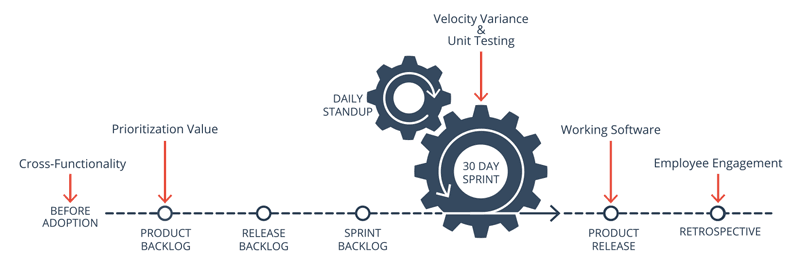
The goal of a given release is to deliver a subset of the product backlog, known as the release backlog. After identifying which user stories will go into a particular release, the user stories become part of a release backlog, which is then prioritized by the development team, who also estimates the amount of time involved in completing each item.
Each sprint (or short duration milestone) takes a manageable chunk of the release backlog and gets it to a ship-ready state! Sprints generally range from a couple of days to 30 days in length. Remember, the shorter the release cycle, the shorter each sprint should be, with two to a dozen sprints in a given release. At the end of each sprint, you should have a fully tested product with all the features of the sprint 100% complete.
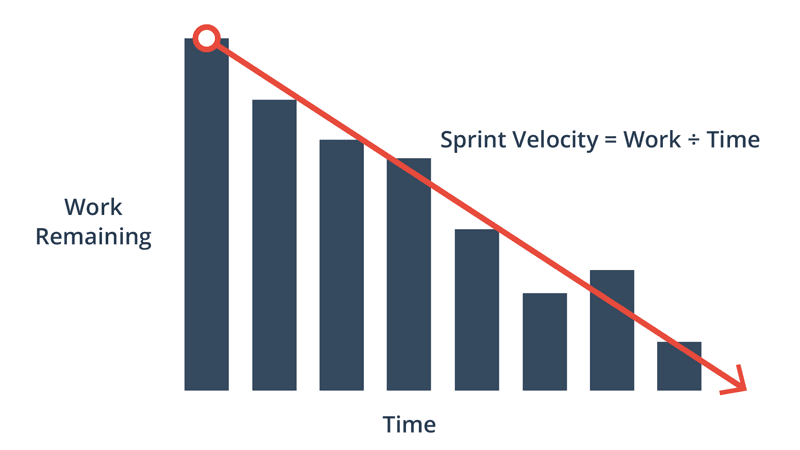
The progress of the team is monitored using a burndown chart—one of the best project visibility tools. The burndown chart provides a day-by-day measure of the amount of work that remains in a given sprint or release. The slope of the graph, or burndown velocity, is the average rate of productivity for each day. Knowing whether or not the project is on time or late in the schedule can help teams make the proper adjustments necessary to get the project on-track.
Short daily standup meetings (also known as the Daily Scrum) ensure everything is on track and everyone has the tools they need. Team members discuss the work they have completed since the last meeting, any obstacles in their way, and what they are working on next. This process is essential in ensuring that information flows freely between team members.
After each sprint, a longer sprint retrospective meeting helps fine-tune the process. This is a time for each team member to reflect on what went right and areas for improvement. After all, Scrum is a flexible agile development method that needs constant improving and tweaking for every team.
For more in-depth, free resources that will help you learn Scrum and implement it within your team, visit ScrumHub.com.